Tamil Nadu Class 10 Result 2026 Declared: 94.31% Students Pass, Download Link Available
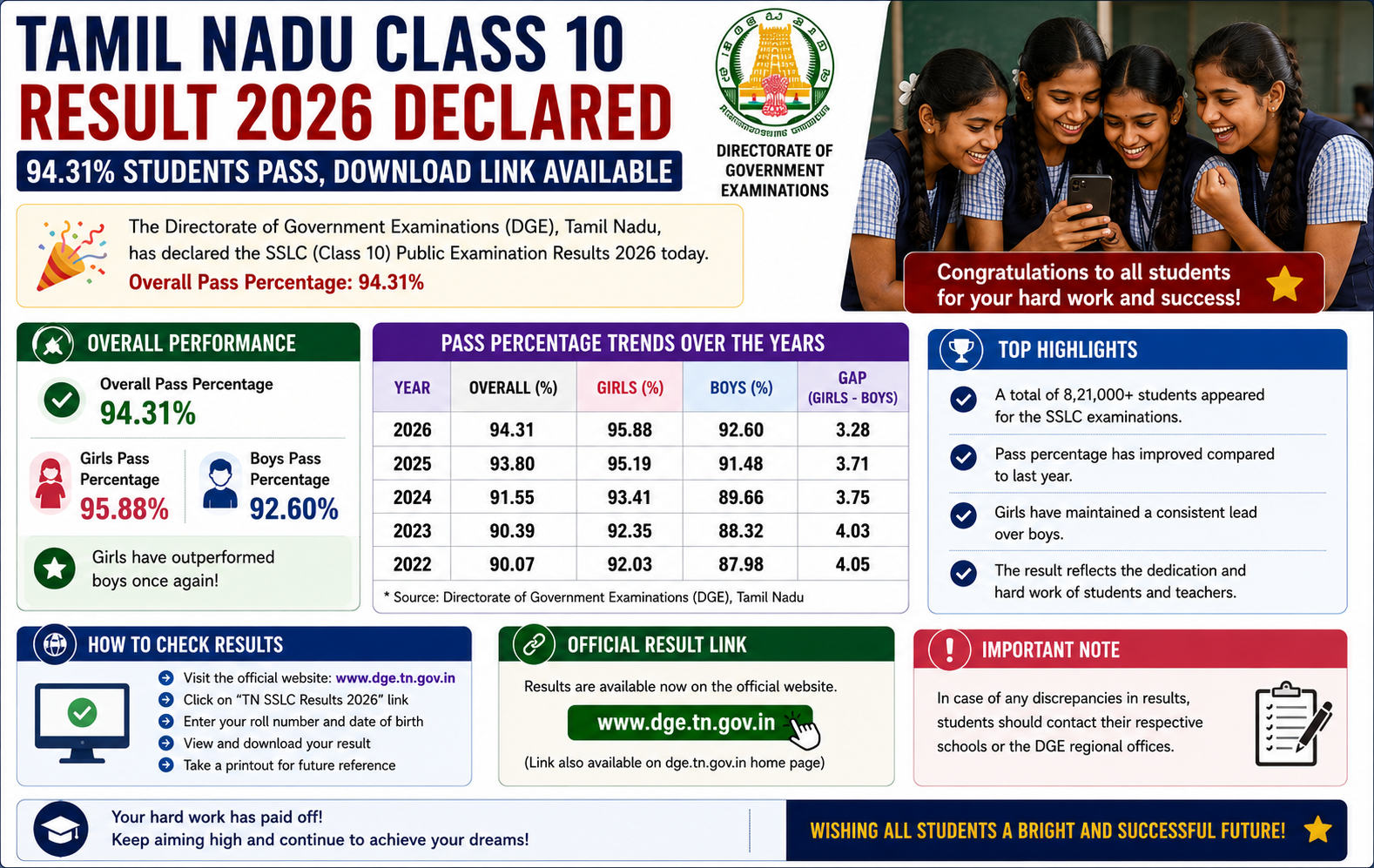
The Directorate of Government Examinations, Tamil Nadu, has declared the Class 10 SSLC Result 2026 today, May 20, at 9:30 AM. This year, 94.31% of students have passed the examination. Students can now download their provisional marksheets from official websites, DigiLocker and UMANG.
Tamil Nadu Class 10 Result 2026 Declared
The Tamil Nadu Directorate of Government Examinations has announced the Class 10 SSLC Result 2026. The result was declared on May 20 at 9:30 AM through official result portals.
Students who appeared for the examination can now check their marks by entering their registration number and date of birth. The provisional marksheet can be downloaded from tnresults.nic.in, dge.tn.gov.in, DigiLocker and UMANG.
TN SSLC Result 2026: Key Highlights
| Particular | Details |
|---|---|
| Result Name | Tamil Nadu SSLC Class 10 Result 2026 |
| Result Date | May 20, 2026 |
| Result Time | 9:30 AM |
| Overall Pass Percentage | 94.31% |
| Students Appeared | More than 8.7 lakh students |
| Official Websites | tnresults.nic.in, dge.tn.gov.in |
| Other Platforms | DigiLocker and UMANG |
| Required Credentials | Registration number and date of birth |
Official Websites To Download TN 10th Result
Students should check the result only through official platforms. If one website becomes slow due to heavy traffic, candidates can use alternate official portals or DigiLocker.
| Platform | Website / App | Use |
|---|---|---|
| Official Result Portal | tnresults.nic.in | Check Class 10 result online |
| DGE Tamil Nadu | dge.tn.gov.in | Official board updates and result access |
| DigiLocker | digilocker.gov.in | Download digital marksheet |
| UMANG | umang.gov.in / UMANG App | Access result through government services platform |
How To Check TN SSLC Result 2026 Online
Students can follow these steps to check and download the Tamil Nadu Class 10 provisional marksheet:
- Visit the official website: tnresults.nic.in.
- Click on the “TN SSLC Result 2026” link on the homepage.
- Enter your registration number.
- Enter your date of birth in the required format.
- Submit the details to access the result.
- Check subject-wise marks and result status.
- Download the provisional marksheet.
- Take a printout for future admission and document use.
How To Download TN SSLC Marksheet Via DigiLocker
Students can also download their Tamil Nadu Class 10 digital marksheet through DigiLocker after signing in with a registered mobile number or Aadhaar-linked account.
- Visit digilocker.gov.in or open the DigiLocker app.
- Sign in using registered mobile number or Aadhaar-linked account.
- Search for “Tamil Nadu Class 10 Result 2026”.
- Select the Tamil Nadu SSLC result document.
- Enter the required credentials such as roll number or registration number.
- Download and save the digital marksheet.
Details Mentioned On TN 10th Provisional Marksheet
Students should carefully verify all details printed on the online marksheet. Any error should be reported to the school or board authorities through the official process.
- Student name
- Registration number
- Date of birth
- School name
- Subject-wise marks
- Total marks
- Result status
- Grade or division details, if mentioned
What Students Should Do After Checking Result
After downloading the result, students should save both digital and printed copies of the provisional marksheet. The original certificate and marksheet will usually be issued through schools later.
Download Marksheet
Save the provisional result PDF from the official website, DigiLocker or UMANG.
Verify Details
Check name, registration number, subject marks and result status carefully.
Plan Class 11
Discuss stream selection, school admission and future subjects with parents and teachers.
Provisional Marksheet Vs Original Certificate
The online marksheet is useful for immediate reference, but students should collect the original document from their school when it becomes available.
| Document | Purpose | Student Note |
|---|---|---|
| Online Provisional Marksheet | Immediate result checking and temporary use | Download and print after result declaration |
| DigiLocker Marksheet | Digital academic record | Useful for secure online access and verification |
| Original Marksheet | Official physical document | Collect from school later as per board process |
Result Day Checklist For Students
- Keep registration number ready
- Keep date of birth ready
- Use only official result links
- Do not panic if website is slow
- Download provisional marksheet
- Take a printout
- Check all personal details
- Contact school if any error appears
FAQs On Tamil Nadu Class 10 Result 2026
Has Tamil Nadu Class 10 Result 2026 been declared?
Yes. Tamil Nadu Class 10 SSLC Result 2026 was declared on May 20 at 9:30 AM.
What is the pass percentage in TN SSLC Result 2026?
The overall pass percentage is 94.31%.
Where can students check TN 10th Result 2026?
Students can check the result at tnresults.nic.in, dge.tn.gov.in, DigiLocker and UMANG.
What details are required to download the result?
Students need their registration number and date of birth to check the result online.
Can students download the marksheet from DigiLocker?
Yes. Students can download the digital marksheet from DigiLocker after logging in with required details.
Is the online marksheet final?
The online marksheet is provisional. Students should collect the original marksheet and certificate from their school later.
What should students do if there is an error in the marksheet?
Students should contact their school immediately and follow the official correction process.